ECC Error Injection
Phoebe Conetits
May 18, 2026
Intro
Describing computer data as information encoded in ones and zeroes is not inaccurate, but it is abstract: what are those ones and zeroes? What does that mean? Some physical object must represent them. In the case of DRAM, ones and zeroes are stored by selectively charging capacitors. Each capacitor in a DRAM chip has a companion transistor that controls it, and the two make up a cell that can store one bit. If the capacitor is charged, the cell holds a one, and if it's discharged, it holds a zero. A DRAM cell fundamentally works the same whether it's at nanometer-scale in a state-of-the-art computer chip or centimeter-scale in a state-of-the-art breadboard. (Foot 2020)
Building DRAM on a breadboard is left as an exercise for the reader. I'm bringing it up because I really need to emphasize that computer data is not merely abstract numbers but the result of actual physical phenomena and objects, even something as simple as a jumper on a motherboard. The electric fields in modern DRAM's nanoscopic capacitors I'd like to discuss today store data exactly as well as the fields in the capacitors big enough to solder. The fields are just smaller and weaker.
Ever-smaller capacitors and ever-smaller transistors need less current to charge and saturate, respectively. The capacitance of a DDR5 cell's capacitor is close to a million times lower than the breadboard capacitors, (Patel et al. 2024) which means each electron's contribution to its voltage is a million times larger. This is great for performance because cells charge and discharge faster, but one consequence is that they're more likely to experience soft errors—a spontaneous bit flip—due to interference from their environment. If, for example, a cosmic ray strikes a circuit, it can induce a current. Something the size of the breadboard DRAM wouldn't be fazed, but that same amount of current could absolutely flip a bit in a nanoscopic DRAM cell.
Cosmic rays are generally accepted as the most common type of interference, and there's not really a practical way to totally prevent them. The solution, then, is to accept that not all soft errors can be prevented and instead make memory that knows whether its contents are correct.
ECCError correction code memory does exactly that. It works by storing parity alongside data. In order to keep this writeup brief, I'll refrain from getting too deep in the weeds explaining details, but the main thing to understand is that parity is metadata—data about data—that uses some memory to describe the contents of the rest of the memory. With some clever math, it's possible to design an algorithm that can use this metadata to not only detect alterations to memory contents but actually determine the data that was there originally.
"ECC" typically refers to a specific type of ECC memory that's rare in consumer electronics and PCs but ubiquitous in servers and common in other systems such as high-end workstations and embedded or industrial control systems. Basically, if a business can expect a system crash or database corruption to cause downtime in a way that costs money, there's a good chance that the system or database has ECC memory protecting it. And because it's desirable for businesses but not really necessary for the average PC user, ECC is often sold as a premium feature in order to create market segmentation. Intel is particularly bad about this and requires both a compatible CPU and motherboard chipset; the latter is completely artificial given that the memory controller was moved out of the chipset back in 2008's Bloomfield. (In-band)
But while Intel's arbitrary segmentation is often frustrating, the silver lining is that it's clear. I am 100% confident that my servers featuring Xeon E3 CPUs and C220-series chipsets support ECC memory. Meanwhile, I am 100% confident that my desktops featuring a Core i7 and i9 CPUs and Z-series chipsets do not. Contrast this with AMD where I'm not entirely confident whether any of my systems from them do or don't support ECC.
AMD Stands for Ambiguous Memory Details
AMD has spent most of their history playing second fiddle to Intel in the x86 market, and presumably because of this, AMD has historically segmented fewer of their CPUs' and platforms' features between mainstream PCs and enterprise servers. This includes ECC support. AMD's FX and Ryzen CPUs for desktops and their Opteron and Epyc counterparts for servers, for example, all support ECC. That gives FX and Ryzen a small advantage over contemporary competing Core CPUs from Intel: a desktop AMD PC can be used as a budget workstation or basic server in ways that require stepping up from Core to Xeon.
ECC support is left in the hands of the motherboard vendor. It's easy to tell if a motherboard doesn't support ECC because the specs sheet and manual will explicitly say "non-ECC" memory is supported. If ECC memory modules are supported, then the specs sheet will say so, but supporting ECC memory modules is NOT the same as supporting ECC functionality! All the motherboard vendor has to do is create a BIOS that dutifully boots up with ECC modules installed that just… doesn't support the ECC functionality. Additionally, desktop motherboard BIOSes typically don't acknowledge that they support ECC functionality or report errors even if both ECC memory modules and ECC functionality are supported. A computer that supports ECC and a computer that doesn't support ECC look exactly the same as long as they both boot with ECC memory modules installed, so you're relying on hope and a prayer to ensure data integrity. If that were sufficient, we wouldn't need backups. (Music)
Good luck figuring out a way to test ECC support!
Figuring Out a Way to Test ECC Support
Some CPUs and chipsets support ECC error injection, which allows deliberately introducing a soft error in software. This is unreliable, and many modern CPUs including all Ryzen CPUs (Ryzen) actively block it because allowing intentionally corrupting memory opens something of a security hole. ("ECC Technical Details")
If software is unreliable, then why not hardware? As mentioned above cosmic rays are a source of soft errors, but obtaining a source of ionizing radiation to replicate their effects in a home setting is non-trivial and often considered a bad idea. Devices that inject errors onto the memory bus exist, ("ECC Tester") but these are prohibitively expensive for home users and only work with one form-factor of memory module anyway.
Thankfully, this problem has been solved previously. Cocojar et al. in 2019 interpreted ECC error injection quite literally and built a doohickey out of sharps and hot glue. (Cojocar et al. 2019)
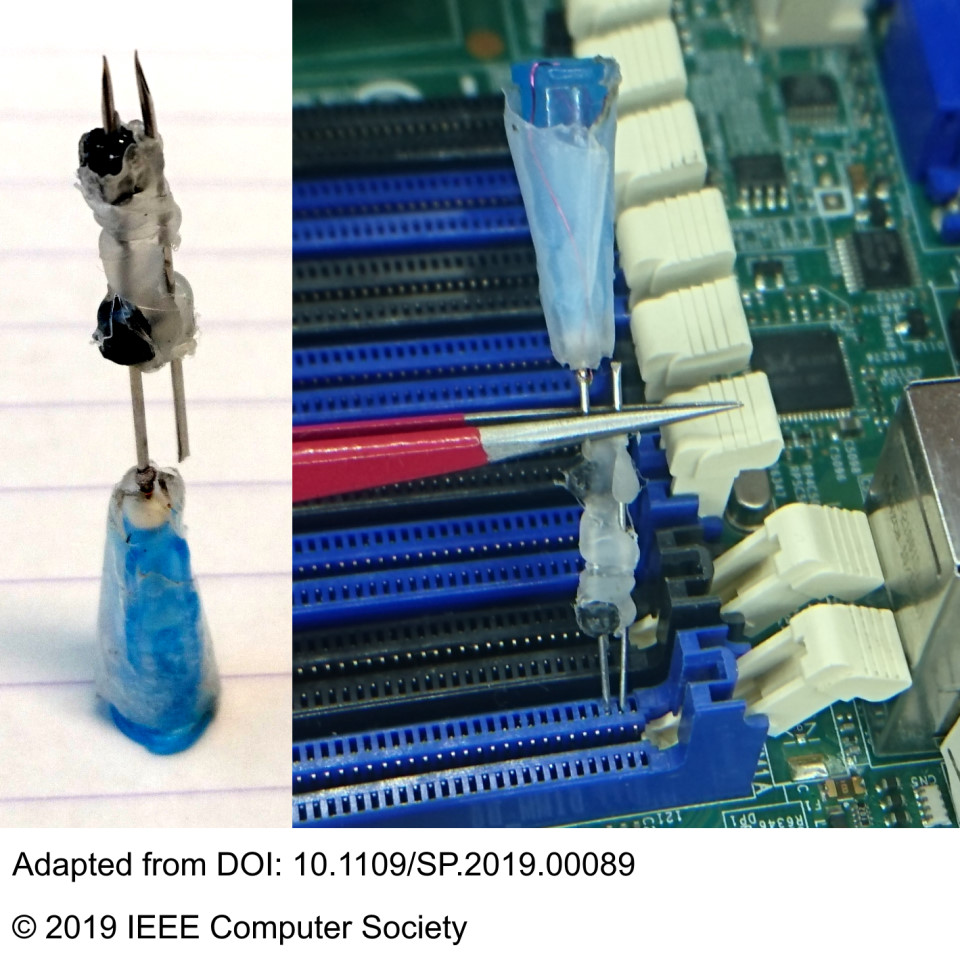
I replicated their procedure as best I could. A 25-gauge luer lock needle was attached to a syringe filled with estradiol valerate solution. The needle was inserted into the subcutaneous belly fat of the author, and the plunger on the syringe was depressed in order to inject estradiol valerate solution into the author. The author was very brave. Please tell the author she was brave. The needle was removed from the author, rinsed in 91% isopropyl alcohol, and recapped. The needle and syringe were left to dry overnight.
After drying, the needle was heated using a lighter. Small flame jets emerged from its tip, indicating that it was not totally dry. After heating, the needle was deemed probably no longer a biohazard but merely a sharps hazard.
A second 25-gauge needle was obtained from a pile of tools from a project the author stalled out on over a month ago.
Cocojar et al. do not say which gauge of needle they chose. I chose to use 25-gauge needles both because I had them on hand but also because their outer diameters are literally a hair wider than half a millimeter. A DDR3 slot's pin pitch is 1 mm, and since the plastic between adjacent pins is about as wide as the holes the pins are in, I correctly guessed that the needles would fit without the straining any plastic.
I opted not to hot glue a cut needle to an intact needle and instead let them sit loosely in the pin holes. The needles were shorted by tapping them with a screwdriver.
Test Systems
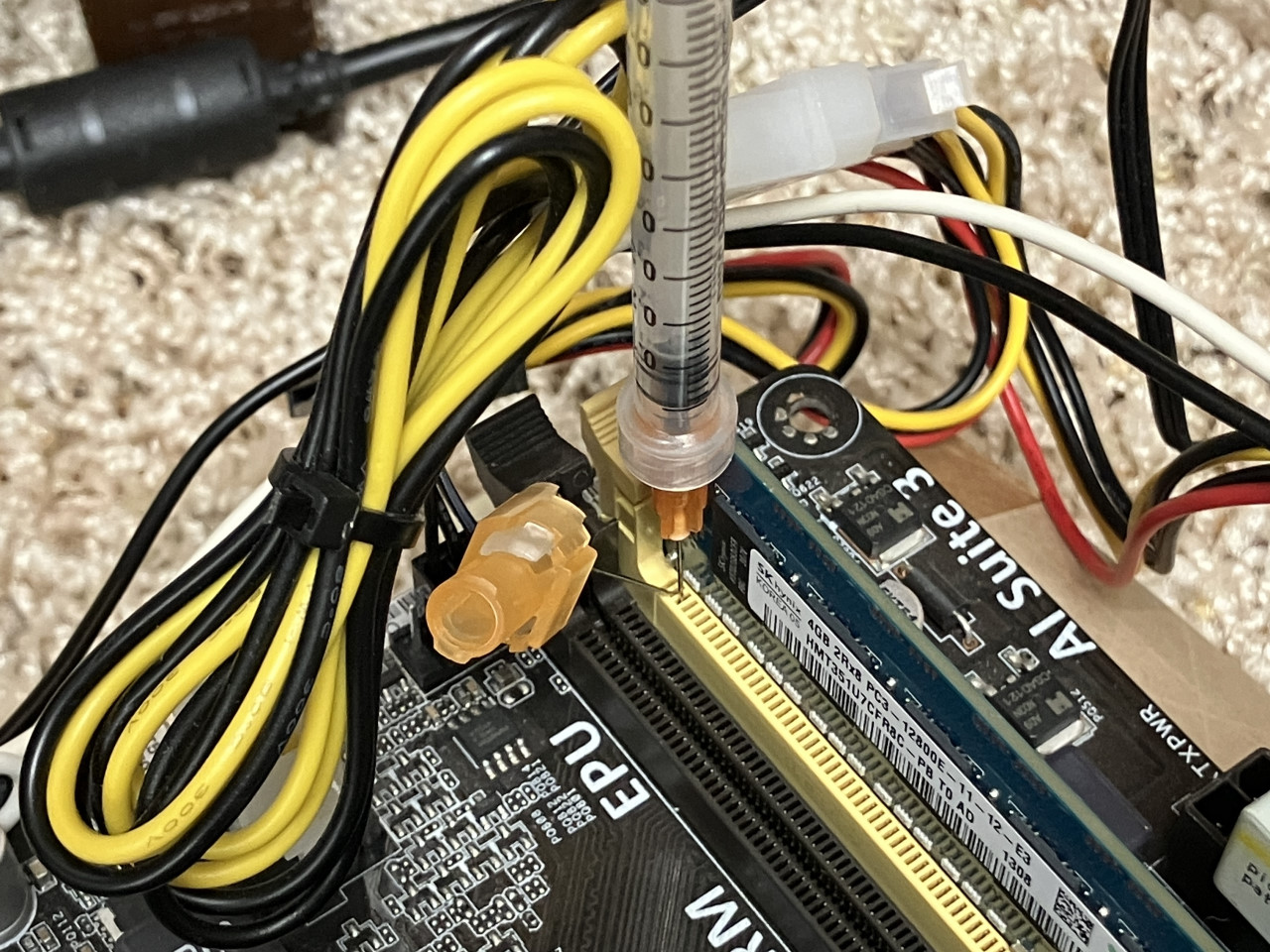
The first system that I tested was my old AM1 system. AM1 was a short-lived socket from AMD released in 2014 intended to be used for extremely cheap desktop PCs; an Athlon 5350—the most expensive AM1 processor offered at launch—and a motherboard typically cost under $100. AM1 was so cheap because its processors were based on the Kabini SoC,System-on-a-chip which AMD had designed for low-cost tablets and netbooks.
The rumor mill had always claimed that my motherboard—an ASUS AM1M-A—supported ECC memory, which made it desirable for basic low-power file servers. While it's odd that AMD would support ECC on a tablet SoC, it's not out of the realm of possibility because the Opteron X1150 and X2150 released the prior year for servers were based on a SoC extremely similar to Kabini if not Kabini itself, and they explicitly supported ECC. ("AMD Launches…") But the evidence that the AM1M-A actually supported ECC was sparse and was limited to one line in the manual that claims it supports ECC DIMMsDual inline memory module ("AM1M-A User's…") and some circumstantial evidence in Memtest86. (CuriousNapper 2014)
I dug the motherboard out of storage and plugged it in. I inserted one ECC DIMM and booted into Memtest86+ v7.0.0. ("Memtest86+ Archives") Once in Memtest86+, I inserted the needles into pins 2 and 3 of the DDR3 socket. These correspond to VSS and DQ0, i.e., ground and the data pin corresponding to the least-significant bit in the bus. The needles were shorted with a screwdriver while Memtest86+ was running.
The second system that I tested was my old server featuring a Xeon E3-1280 v3, a Supermicro X10SLM-F, and four ECC DIMMs inserted. This was a basic entry-level server in 2013 featuring an LGA-1150 socket and dual-channel memory; the CPU is comparable to an i7-4770, for reference.

Because this server is still in use, I opted not to remove the motherboard and install it on my test bench and instead left it in its case. This made it impractical to use needles like with the previous motherboard. Instead, I removed a side panel from the case and put painter's tape over the DIMM slot pins on the back of the motherboard. All pins except pins 2 and 3 of one DIMM slot were covered. Once again, I booted into Memtest86+, and while it was running, I shorted the two pins using a screwdriver.
The third system that I tested was my new server featuring a Ryzen 5 5600, an ASRock Rack X570D4U-2L2T, and two ECC DIMMs. Like the old server, I left it in its case, removed a side panel, taped over the pins on the back of the DIMM slots, and left two pins exposed. The new server uses DDR4 unlike the other systems that use DDR3, so DQ0 and an adjacent VSS are located at pins 5 and 4, respectively. ("Desktop DDR4…")
Observations
Memtest86+ detected errors immediately upon shorting the needles in the AM1 system. Quickly tapping the screwdriver usually injected only one error, but occasionally, one tap injected multiple errors. Errors were always in the same position; only the least-significant bit in the bus was ever flipped. Additionally, errors were always in the same direction; a zero would flip to a one but a one would never flip to a zero. If enough errors were injected during a sufficiently short window, Memtest86+ would freeze and require a reboot.
-
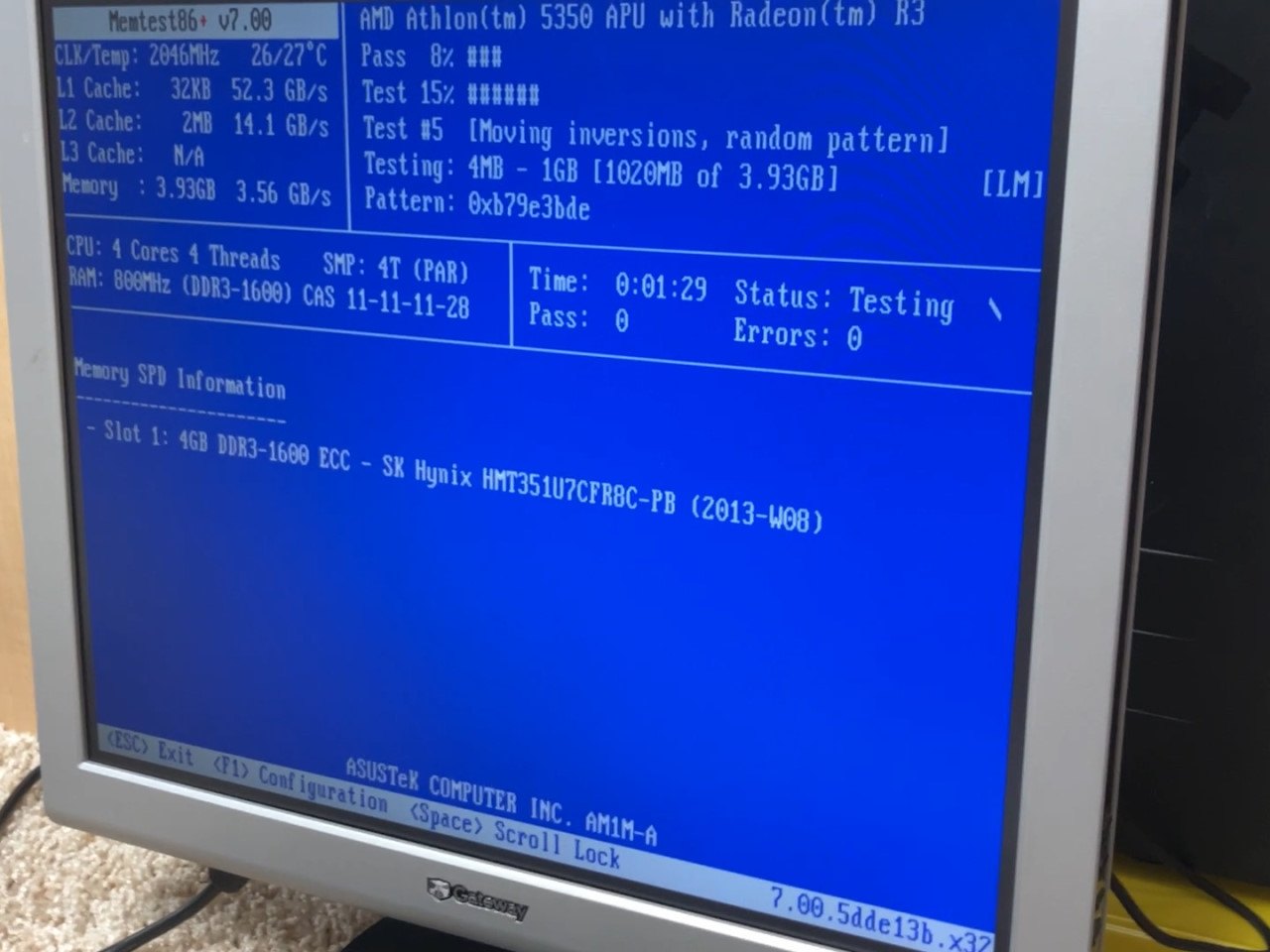
A photo of Memtest86+ running on a monitor. -
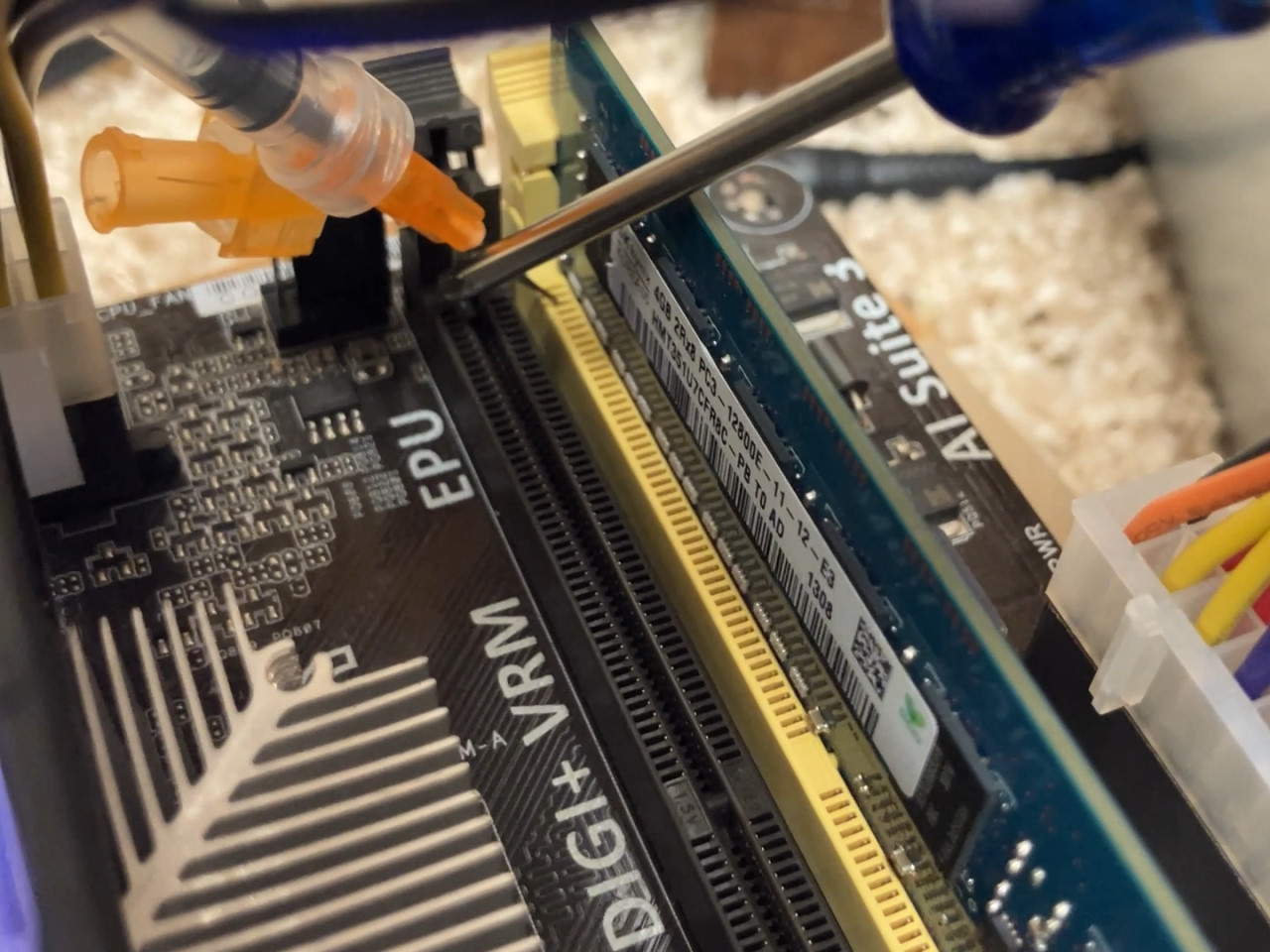
Tapping a screwdriver to needles inserted into a DIMM slot. -
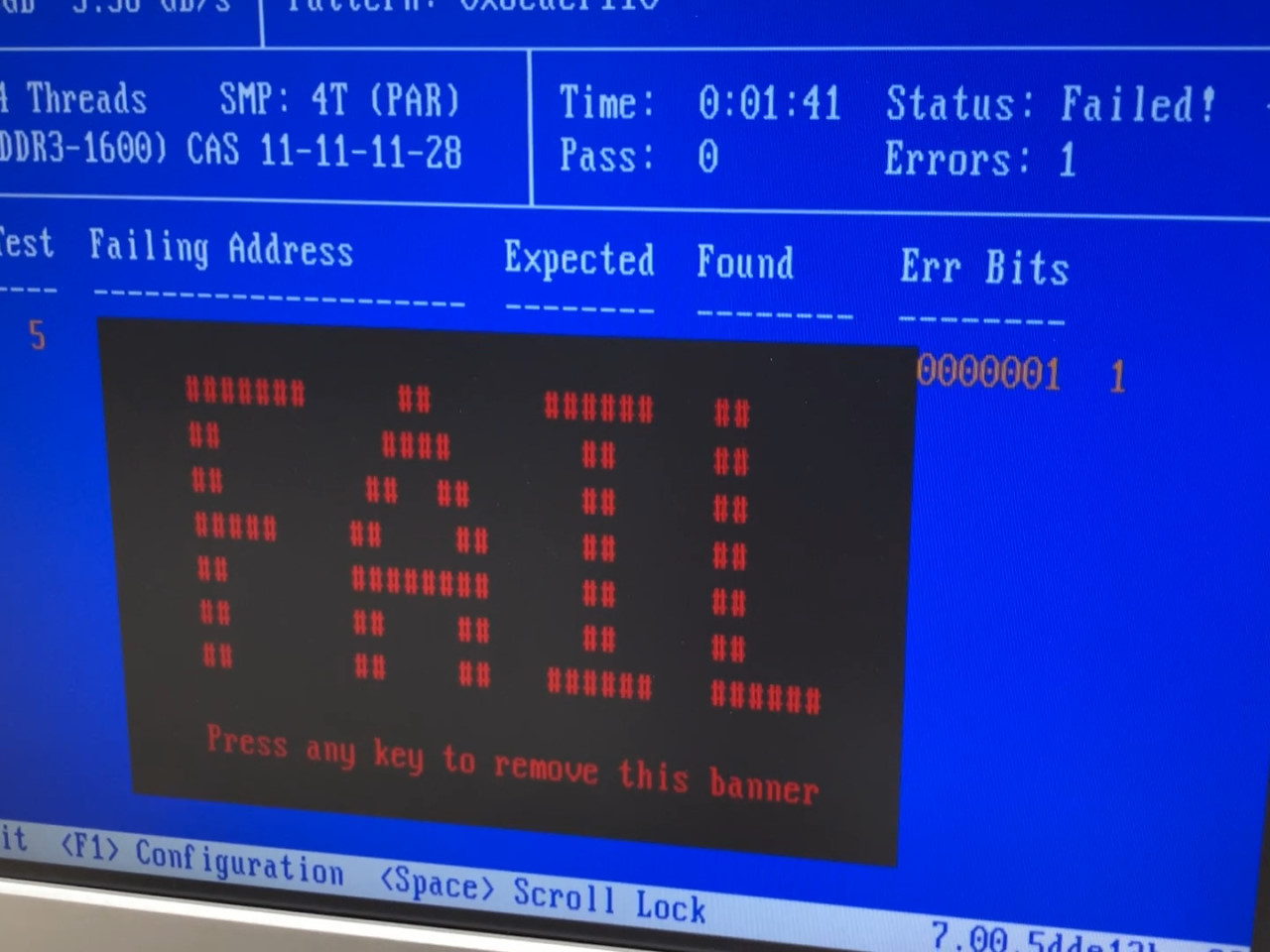
Memtest86+ proudly displaying a "FAIL" banner. -

Additional errors in Memtest86+.
Memtest86+ detected no errors when shorting pins in the old server. However, the system froze for about three seconds each time the screwdriver tapped pins 2 and 3. If the screwdriver was held long enough, Memtest86+ permanently froze and required a reboot.
I was dissatisfied with Memtest86+'s lack of error reporting, so I rebooted into Windows 10—the operating system that this server uses. The X10SLM-F features WHEAWindows hardware error architecture reporting, so errors can be logged in Event Viewer. After logging in and waiting for the system to idle, I tapped the screwdriver to the pins. Windows immediately froze for about forty seconds. After forty seconds, Windows became responsive again, but there was a significant amount of input lag. Nonetheless, Event Viewer was successfully opened, and a new event with ID 2—a corrected hardware error—had appeared. The input lag did not return to normal, so the system was rebooted.
Finally, the X10SLM-F features error logs in BIOS. I rebooted to BIOS, checked the logs, and found several hundred errors with timestamps corresponding to when I did these experiments. Notably, despite only ever shorting pins on one DIMM slot, errors in BIOS were reported for both DIMMs.
The new server behaved the same as the old server in Memtest86+. Tapping the screwdriver to the pins caused Memtest86+ to freeze, albeit for shorter durations. Eventually, the screwdriver was held long enough to cause a permanent freeze and require a reboot.
While the X570D4U-2L2T does support event reporting, I could not find any BIOS or IPMI pages that displayed logged memory errors.
Results and Discussion
The error injection clearly worked as expected in the AM1 system. The consistent positions of the errors indicate that they were indeed induced by shorting two pins together. That the error in question was always the least-significant bit is easily explained by pin DQ0's corresponding to the least-significant bit in the bus.
Because whether a bit is a one or a zero is determined by the voltage state on the memory bus' corresponding data pin, shorting a data pin to ground should only result in an unexpected voltage and thus bit error for one state. This explains why all errors were the result of a zero flipping to a one: the data pin was already at the same voltage as VSS when transferring a one, so the short caused no change.
However, the direction that bits flipped was unexpected. To the best of my knowledge, DDR memory stores a zero when a data pin is pulled to ground and a one when it's pulled to VDD, i.e., the memory's operating voltage. I cannot verify whether my intuition is wrong or if AMD is using an active low memory bus. ("BIOS and…") Perhaps pulling the data pin low results in a transistor in a corresponding DRAM cell being pulled low, causing it to activate and charge the capacitor under its control? I'm honestly not sure. Whether I understand the circuitry in play is less important than the fact that the circuitry behaves consistently.
The absence of observed errors in the old server suggests that both the error injection worked and the system fully supports ECC. Because only one data pin was ever shorted, I expected that ECC memory should be able to correct all errors induced. This is largely consistent with the behavior of the old server: Memtest86+ never reported any errors, which means all errors must have been silently corrected in the background.
However, error correction seems to come with an extreme latency penalty. Memtest86+ froze for a minimum of about three seconds each time an error was injected. Three seconds may not sound like a long time, but more than two billion memory clock cycles occurred during this time. The entire 16 GiB17.18 GB of installed memory in theory take under a second to read in its entirety, so I am curious if a detected error causes the system to pause everything and verify every single bit in its main memory before returning to normal. This may also explain the input lag in Windows after injecting errors. This latency penalty was never observed in the AM1 system, further supporting that it was the result of error correction.
Finally, the event logs saved in BIOS revealed an interesting detail. First, all events logged were described as single-bit ECC errors, as expected. Second, the errors exclusively occurred in memory channel B, which according to the motherboard manual is the channel connected to the DIMM slot whose pins I shorted. But errors occurred in both channel B DIMMs, not just the DIMM in the shorted slot. This is actually a consequence of how memory slots are designed: the corresponding pins of all slots connected to the same memory controller channel are wired together. Not all of the pins, since the memory controller has to distinguish between different DIMMs somehow, but all of the data bus pins are among those wired together. (Buildzoid 2018) Pin DQ0 in slot B2 is wired directly to pin DQ0 in slot B1, so errors occur on both DIMMs because shorting either slot's pin achieves an identical result.
The new server behaved similarly to the old server. Memtest86+ froze for less than three seconds after injecting errors. I am unsure why it recovered faster than the old server. Nonetheless, I am confident that this CPU and motherboard do support ECC. (Paid)
Conclusions
Memory error injection is easily and affordably achieved using nothing more than needles or a substitute such as small lengths of wire, or by protecting most of a DIMM slot's pins and only shorting a couple of them left intentionally exposed. I am satisfied that I have confirmed approximately twelve years too late that the ASUS AM1M-A does not support ECC memory functionality. I am also satisfied that my new server featuring a standard Ryzen CPU does support ECC. Finally, I am satisfied with ECC memory as a concept and am confident that it protects against any plausible bit flips.
My investigation has given me a new question regarding ECC: what's the point? Why bother with it? Why spend the extra money on ECC memory modules and compatible server or workstation motherboards?
Until last week when I prodded at my old server, Windows had not ever detected a soft error. I have never cleared Event Viewer's logs since installation in January 2020, and in six and a half years, it has never recorded a soft error that occurred by chance. I had originally built the server in March 2018, and the BIOS had never logged a single error in the eight years and some change that I've owned this system nor in the perhaps four prior years it was used in a production environment.
Error rate estimates are all over the place and vary by several orders of magnitude. One large-scale study claims there is a 0.22% chance of a soft error per memory module per year. (Schroeder et al. 2009) Since the old server only had two memory modules for most of its existence, it had a 99.78% chance to not experience an error, squared for the second memory module, raised to the power of eight years. (Ranks)
Of course I've never recorded an error! There's only a 3.5% chance that I'd've seen one!
The paper also found that DIMMs that experienced errors were more likely to experience errors in the future. If the main type of errors were soft errors, i.e., errors caused by some kind of interference, there should be no correlation there. A cosmic ray chooses a random memory module every time it strikes one. This suggests that a significant number of errors are actually hard errors, i.e., an error caused by a physical fault in the hardware, be it the memory chips, memory module, motherboard, or memory controller. Simply having RAM that works properly seems to lower the probability of errors.
Appendix: Determining ECC Support from Memory Temperature
In order to avoid negatively impacting memory throughput or capacity, ECC memory modules have extra memory chips for storing parity. For every eight chips storing data, there's a ninth chip storing parity. This chip is usually located in the middle of the memory module; I have a DDR3 DIMM whose circuit board was designed so it could be used for either standard or ECC DIMMs.
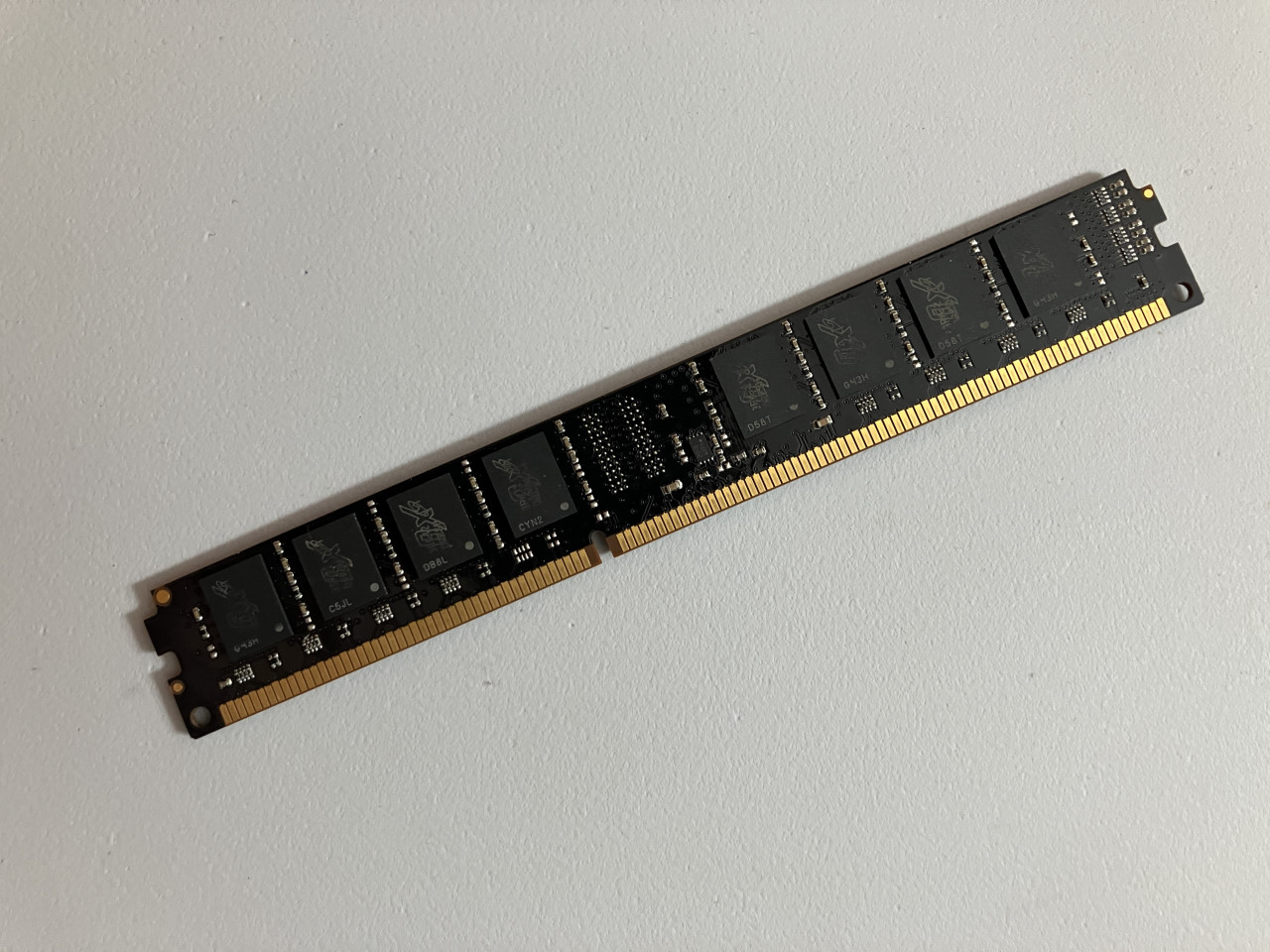
I hypothesized that, if a system booted with an ECC DIMM installed but did not actually use ECC, then the chip dedicated to parity should be cooler than the others. Memory chips heat up when data is read from and written to them, so logically if a memory chip is unused then it should produce less heat.
I booted the AM1 system into Memtest86+. The DIMM slots were located awkwardly close to both the CPU heatsink and the 24-pin power connector, so my IR thermometer couldn't fit. Additionally, the memory chips were smaller than the IR thermometer's sensor, so it was impossible to read only each chip's temperature.
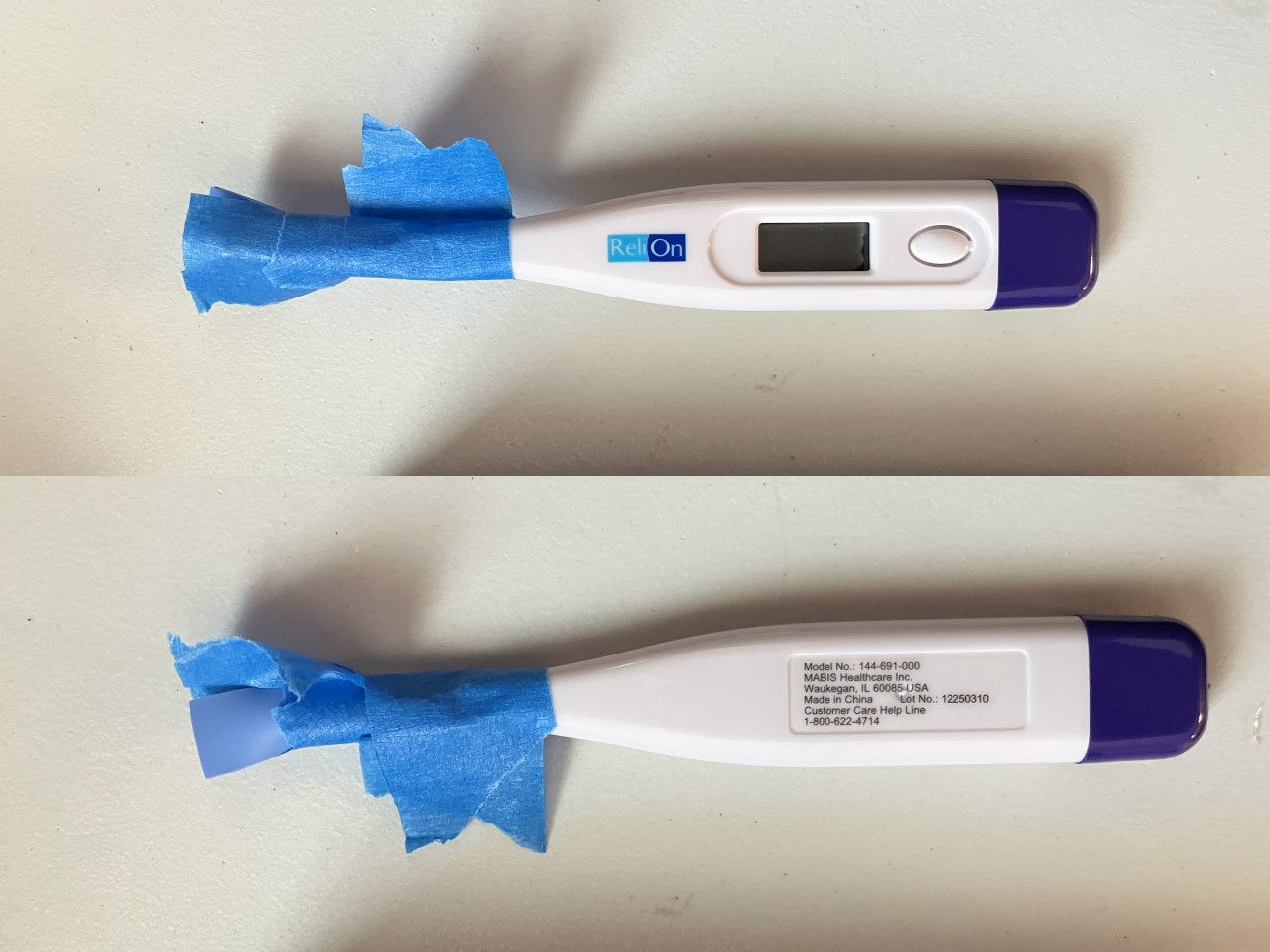
I took an oral thermometer and taped a thermal pad to its tip. A DDR3 chip's operating temperature is close enough to a human with a fever that the thermometer was able to, with some effort, read memory chip temperatures.
The thermometer was quite slow to read, and Memtest86+'s workloads are variable enough that the chips' temperatures change relatively quickly, so precise readings were difficult to obtain and meaningless anyway. This was moot, though, because the center memory chips were found to be no cooler than the chips around them. The DIMM's circuit board was warm to the touch, indicating that the memory chips conducted quite a lot of heat into it. It's likely that the circuit board conducted some of this heat into the unused chip.
Revisiting this technique with a thermal camera or decent quality thermocouples may yield success, but I don't own the necessary equipment.